

How To Create You Own Website - Step by Step Guide by Jon Delectar - HTML preview
PLEASE NOTE: This is an HTML preview only and some elements such as links or page numbers may be incorrect.
Download the book in PDF, ePub, Kindle for a complete version.
Download the book in PDF, ePub, Kindle for a complete version.
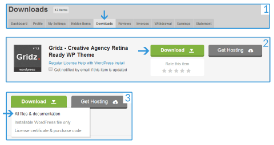
Explanation
1. Login into your Themeforest account and click on "Downloads".
2. Select your template and click on "Download".
3. Download "All files & documentation".
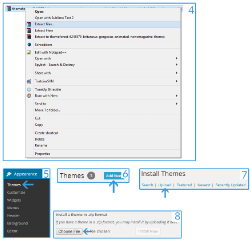
4. Extract the .zip/.rar File.
5. Login to your dashboard (yourblod.tld/wp-admin/index.php) and click on themes.
6. Click on "Add New".
7. Click on "Upload".
8. Click on "Choose File".
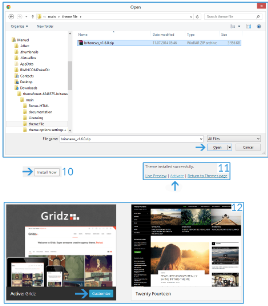
9. Select the main file and click on "Open".
10. Now click on "Install Now".
11. "Activate" the template.
12. Now you could "Customize" your template (see "Default customization").
12+. Please note that every template work other and if you need personal help only write me an email.